Duco

Agentic workspace

Creating a world where operations professionals supervise teams of agents and move from task-work to decision-making

man walking in front of textured wall

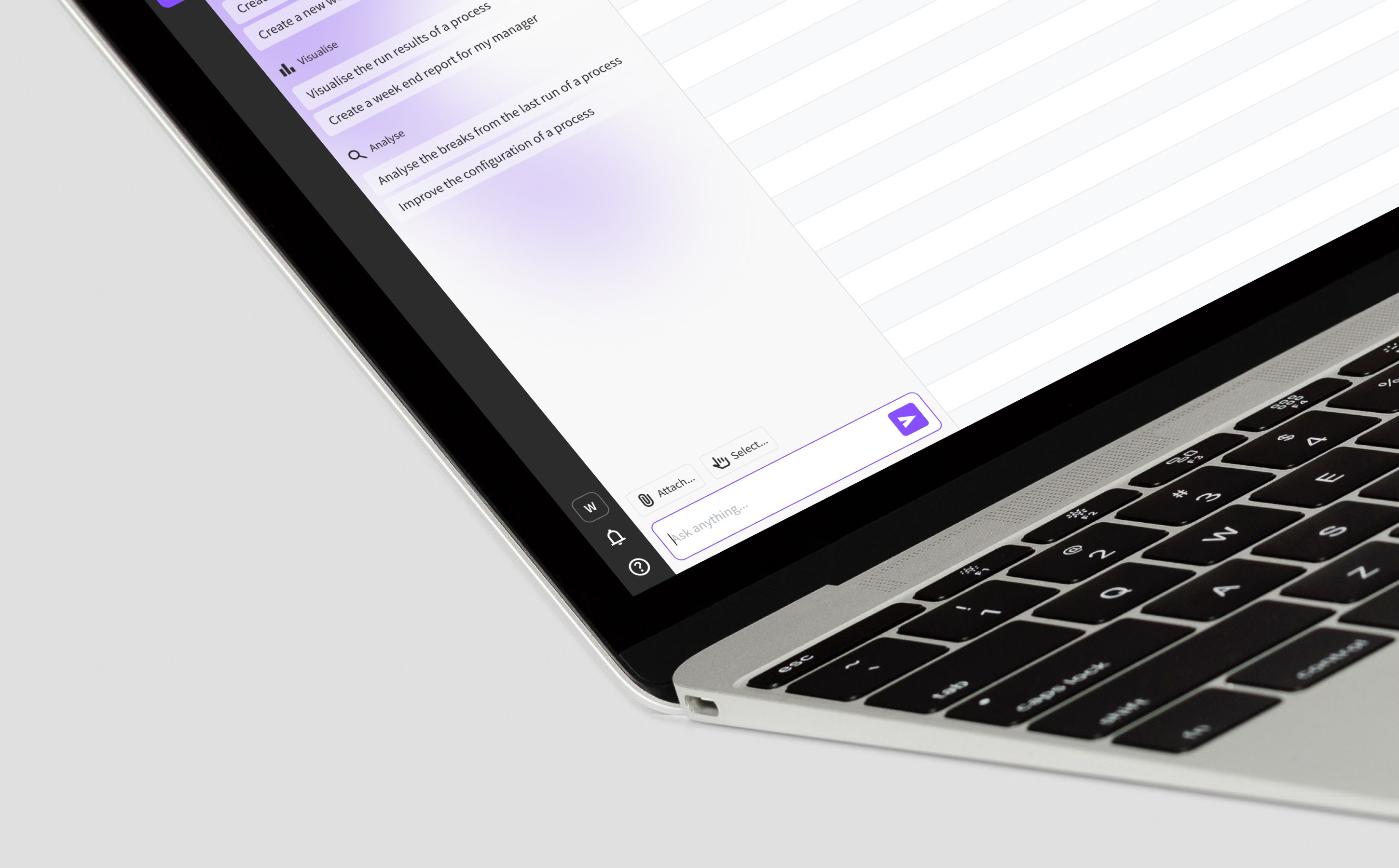
Designed to be “always open”, agentic workspace reimagines the user as an agent manager

Brief

MissionDuco is an operational data automation platform used by the world’s biggest banks. Users perform repetitive, time consuming tasks while dealing with vast sets of fast moving data. This includes identification and analysis of issues, categorisation, allocation and resolution. While these task are tedious, they are also critical – mistakes cost millions of dollars. The mission was to create a collaborative environment where autonomous AI agents do the heavy lifting in a controlled, auditable way.

RoleAs Senior Product Designer, I led the UX strategy and design for this project. My focus was on designing the "collaboration layer" that allows human experts to work alongside AI agents with total transparency. I collaborated with the product team, engineering and in-house machine learning team. Agentic workspace continues to evolve rapidly with new enhancements almost weekly.

ResultAgentic Workspace is a powerful collaboration tool that grants users in operations control over an army of automated AI agents. Productivity skyrockets as users move away from slow manual work to overseeing the work of agents, redefining thier role and limits allowing them to use their time more efficiently while always being in control. Agents can work on instruction, based on conditions or autonomously.

Research

The future workspace for operations

Research focused on identifying where human expertise is indispensable and where AI agents could provide the most value. To move from concept to functional requirements, I spoke to several customers from the Duco Innovation Group. This allowed me to test my UX concepts against the rigid compliance requirements of real-world data controllers in a high-stakes environment. As well as discussing tasks, we also spoke about human psychology. It takes time for people to adjust to a radical new way of working and it’s vital to understand barriers that could prevent this new feature from being adopted. Understanding and trust must be core to the design.
man walking in front of textured wall

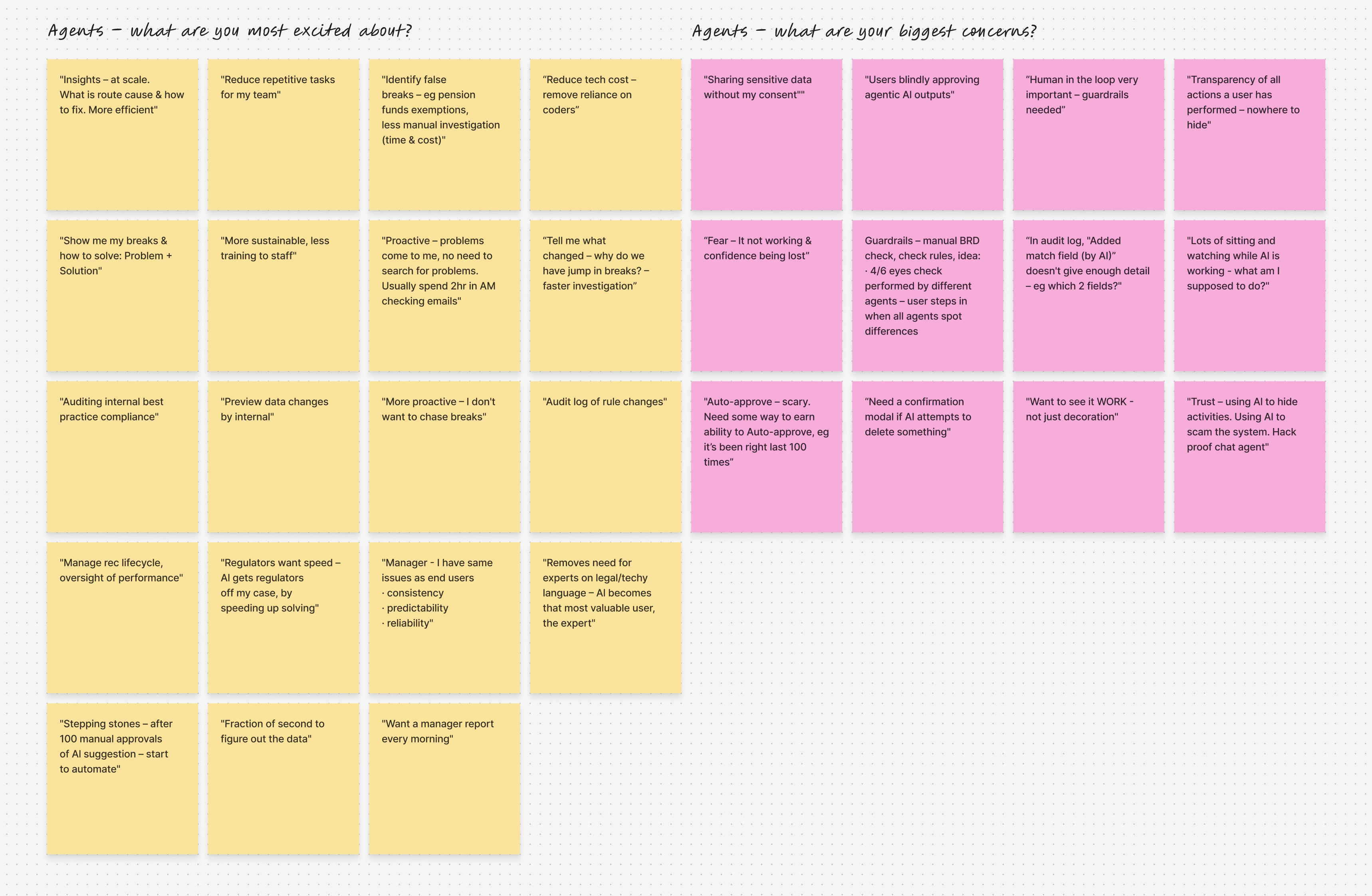
Research revealed users are excited about agentic tech boosting productivity but have concerns around trust

Agentic workspace pillars

I discovered that operations across the trade lifecycle can be broken down into 3 pillars. Agentic workspace should cover all areas while adding a context layer, such as best practice or company guidelines.

BuildDrastically reduce the time to create processes using simple prompts and gain a complete understanding of the data and configurtation logic.

OptimiseAgents should proactively suggest ways of improving process performance, such as reducing false exceptions, increasing reliability and reducing manual intervention.

ManageAutomating exception investigation and management such as root cause analysis, categorisation and assignment. Identify priority of issues and suggest solutions.

From task-worker to decision-maker

The research shifted design focus from incremental automation to a total operational shift, moving the user from "task-work" to "decision-making." I discovered that users were struggling with "fragmented tools" and "reactive firefighting," leading to the need of a unified command centre. In this new model, agentic workspace must support a "supervise and approve" workflow, where the user sets the strategy and agents execute the manual investigation. This ensured that expertise was no longer "locked in heads" but captured as institutional memory within the platform.

Design

Make it feel familiar

Working with agents is still new to most, especially in financial services, which tends to lag behind. However, outside the office, agentic tools are mainstream and certain UX patterns have become expected. For agentic workspace to be adopted, I want to use these existing mental models to make the interaction feel intuitive and familiar. Duco users don’t have time to learn a new tool. The UX feels familiar to users of ChatGPT, Gemini or Claude, while still bespoke to the Duco specific use cases.
man walking in front of textured wall

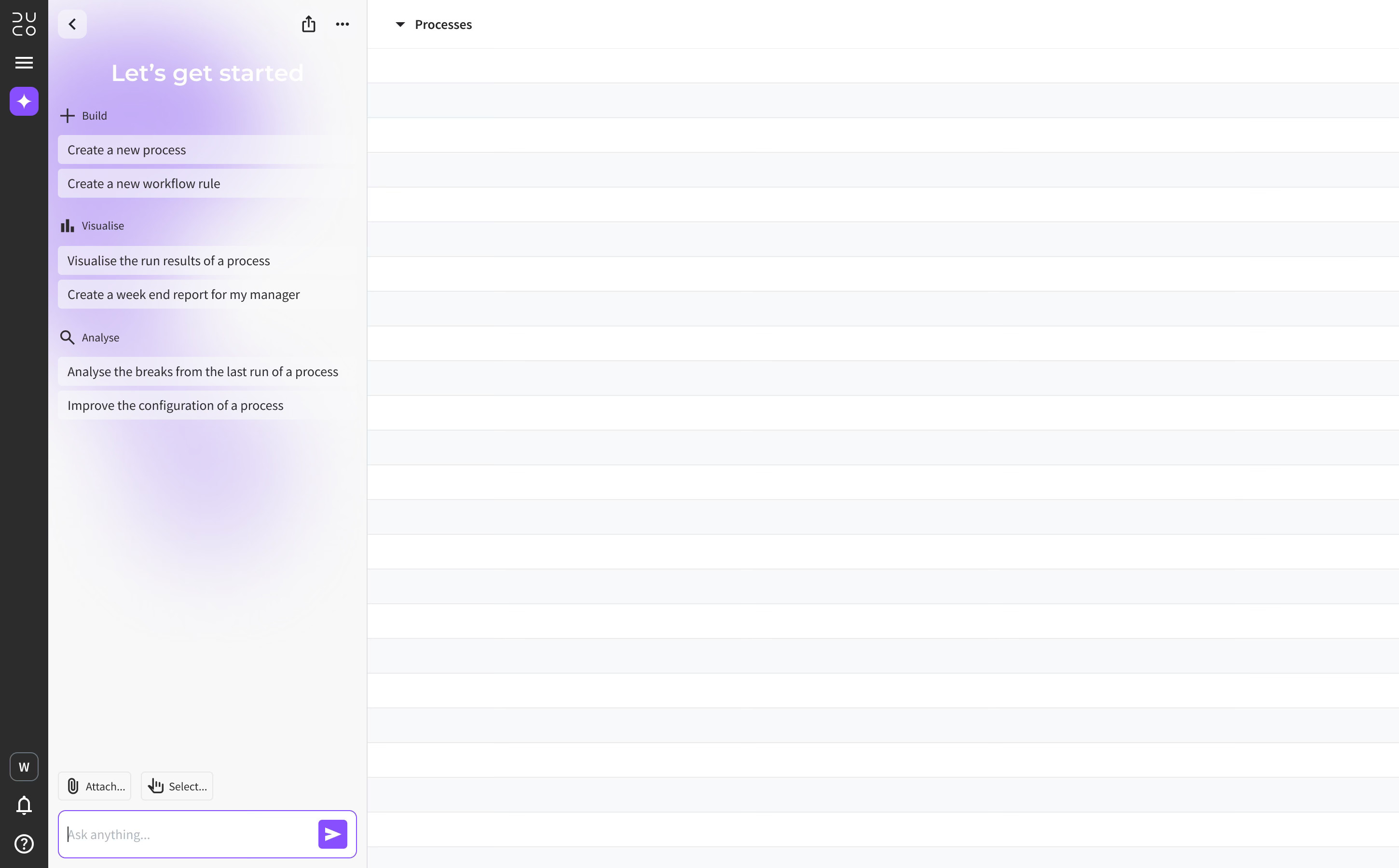
The agentic workspace drawer has been aligned to the left of the page — this is not a bolt-on AI interface, it’s core the the AI-first user experience

3 types of agent, 1 consistent experience

As agentic workspace will become the primary method of interaction, I want it to feel natural. While managing several agents could sound daunting, it’s something we already do with other people. I want to break down that distinction between agent and human. For example, we maintain conversations with colleagues, friends and family on apps and social media, . I identified 3 types of interaction that all feel natural and familiar:

New chatAsk an agent to assist with a one-off request. Simply start a new chat and enter a prompt, adding an attachment for context if desired.

“Create a new 2 sided rec with these files...”

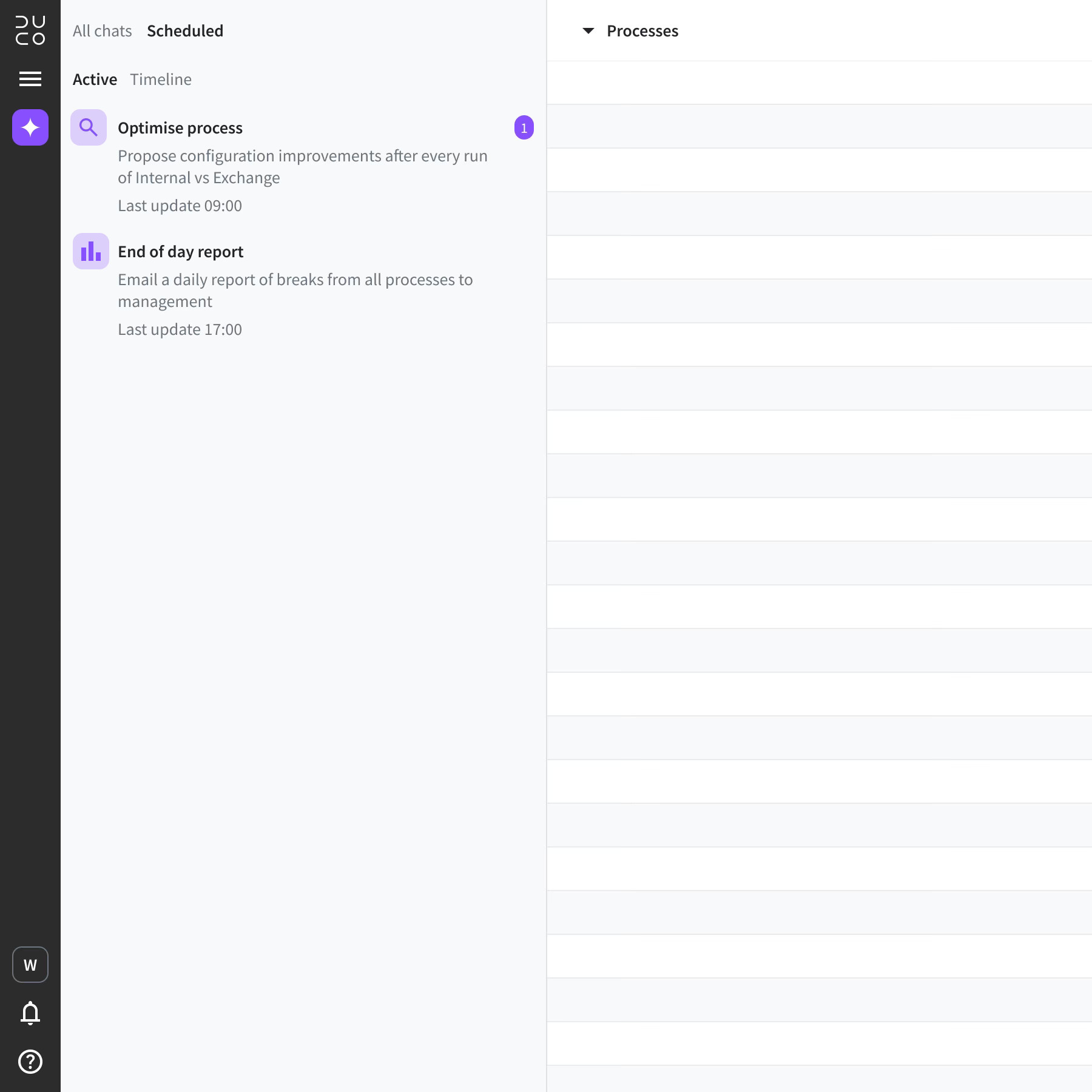
Scheduled agentsAsk an agent to perform an action based on a specified trigger, such as a time or event. The agent will repeat this action automatically, according to instructions.

“Send me a report every Friday at 18:00...”

InsightsAn agent sends a message to the user autonomously – without being asked. Insights update the user with important information and assist with daily priorities.

“Improve match rates by 100%...”
man walking in front of textured wall

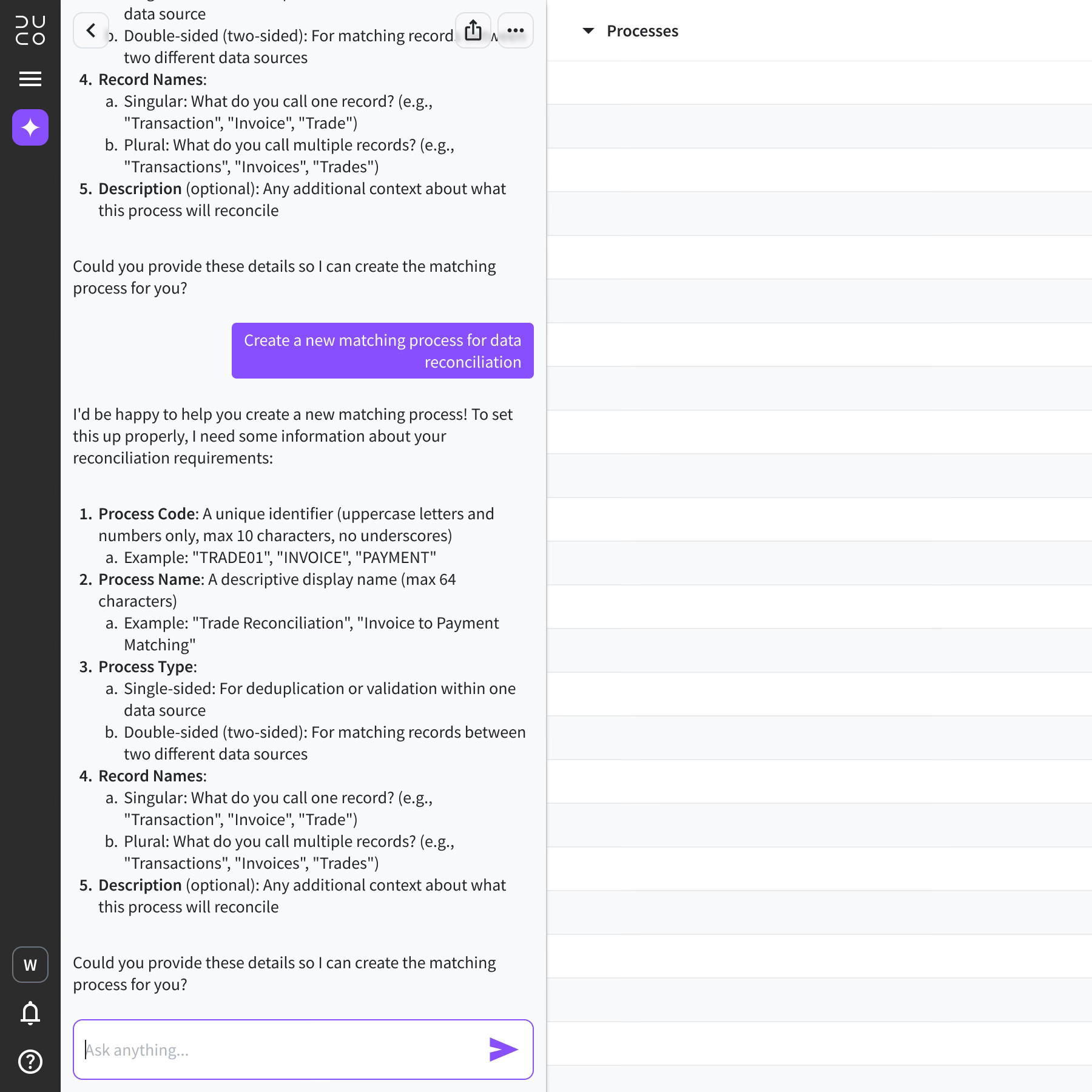
Maximise content area with a full height chat drawer

Chats and scheduled agents are clearly divided into separate tabs

Human in the loop

I identified a need for the first ever home page for the platform. This gives users a centralised and personalised place where they can monitor everything that matters to them. The home page is where agents provide unprompted insights it thinks the user should know. This includes monitoring on process health, trend analysis and prioritisation of tasks. As trust is the biggest challenge facing adoption, the home page helps increase transparency and control. Actions that require manual review and approval are also surfaced here, making it a reliable hub for agent monitoring.

man walking in front of textured wall

The home page is packed with meaningful insights from unprompted agents, constantly looking for ways to improve productivity

Adding context to a chat

There are 2 ways to add context to a chat – attach a file from a computer or select something on the screen. They are both useful in certain scenarios, however the latter is faster, more direct and designed to help with repetitive daily tasks. Using the Select tool, the user can add items from the platform to the chat as context. This gives break investigation huge advantage as the user can select exceptions and query them or perform actions in seconds, reducing the need to download the data for investigation outside the platform.

man walking in front of textured wall

To add context to a chat, the user can select components directly from the platform – data rows, dashboard widgets and more

Other types of context include widgets, NRL rules or entire processes

Knowledge base

A requirement of agentic workspace is that it must be accurate and provide meaningful insights. Users will turned off with generic suggestions or constant mistakes that lead to distrust and a need for micro-management. Knowledge base is the solution. This new page gives agents a better understanding of the industry, company and users personal preferences with knowledge divided into 3 levels. This creates an amazing experience as it means agents actually understand who the user is and what their role is, speeding up conversations, increasing accuracy of responses and improving insights.

GlobalGlobal admin uploads company wide documents relevant to everyone at the business. General policies to be followed by all agents and all users.

GroupGroup admin uploads documents relevant to your department. It could be operational guidelines, resolution workflow, taxonomy, criticality framework and so on.

IndividualPersonal preferences of the individual user. Tell the agent about your role, languages, communication style, preferred formats and anything else you want the agent to know.

man walking in front of textured wall

Agents use knowledge base documents to give users the most reliable, accurate and insightful experience

Review

Mission success

The outcome of this project was more impactful than any I have worked on. Agentic workspace is not just a bolt-on AI chatbot, it reimagines the entire Duco user experience and role of operations professionals. By keeping the design rooted in familiar patterns, users quickly adopted the feature and feedback was overwhelming. Speed, accuracy and predictability are all improved by a huge margin. Building a process went from days to minutes. The way of working has shifted from manual investigation to a manager style, review based day.

man walking in front of textured wall

Presenting agentic workspace to customers at Duco Innovation Day 2025, AWS, London

Looking ahead

I designed agentic workspace as a platform that supports our AI roadmap, with new capabilities being released all the time. The benefit to our customers is huge and continues to grow. Customers have reduced risk while saving costs. The benefit to the company are just as powerful, revenue has increased as the demand for AI powered tools keeps growing. By investing in product design, Duco offers the best user experience in it’s industry, setting the bar for which competitors struggle to reach. In turn, user satisfaction scores are high, sales increase and churn reduced.

More projects

Duco

UI 3

Explore

Duco

Data prep

Explore

stationery materials laying on a grid

© Will Helsby 2026 All Rights Reserved

Duco

Agentic workspace

Creating a world where operations professionals supervise teams of agents and move from task-work to decision-making

man walking in front of textured wall

Designed to be “always open”, agentic workspace reimagines the user as an agent manager

Brief

MissionDuco is an operational data automation platform used by the world’s biggest banks. Users perform repetitive, time consuming tasks while dealing with vast sets of fast moving data. This includes identification and analysis of issues, categorisation, allocation and resolution. While these task are tedious, they are also critical – mistakes cost millions of dollars. The mission was to create a collaborative environment where autonomous AI agents do the heavy lifting in a controlled, auditable way.

RoleAs Senior Product Designer, I led the UX strategy and design for this project. My focus was on designing the "collaboration layer" that allows human experts to work alongside AI agents with total transparency. I collaborated with the product team, engineering and in-house machine learning team. Agentic workspace continues to evolve rapidly with new enhancements almost weekly.

ResultAgentic Workspace is a powerful collaboration tool that grants users in operations control over an army of automated AI agents. Productivity skyrockets as users move away from slow manual work to overseeing the work of agents, redefining thier role and limits allowing them to use their time more efficiently while always being in control. Agents can work on instruction, based on conditions or autonomously.

Research

The future workspace for operations

Research focused on identifying where human expertise is indispensable and where AI agents could provide the most value. To move from concept to functional requirements, I spoke to several customers from the Duco Innovation Group. This allowed me to test my UX concepts against the rigid compliance requirements of real-world data controllers in a high-stakes environment. As well as discussing tasks, we also spoke about human psychology. It takes time for people to adjust to a radical new way of working and it’s vital to understand barriers that could prevent this new feature from being adopted. Understanding and trust must be core to the design.

man walking in front of textured wall

Research revealed users are excited about agentic tech boosting productivity but have concerns around trust

Agentic workspace pillars

I discovered that operations across the trade lifecycle can be broken down into 3 pillars. Agentic workspace should cover all areas while adding a context layer, such as best practice or company guidelines.

BuildDrastically reduce the time to create processes using simple prompts and gain a complete understanding of the data and configurtation logic.

OptimiseAgents should proactively suggest ways of improving process performance, such as reducing false exceptions, increasing reliability and reducing manual intervention.

ManageAutomating exception investigation and management such as root cause analysis, categorisation and assignment. Identify priority of issues and suggest solutions.

From task-worker to decision-maker

The research shifted design focus from incremental automation to a total operational shift, moving the user from "task-work" to "decision-making." I discovered that users were struggling with "fragmented tools" and "reactive firefighting," leading to the need of a unified command centre. In this new model, agentic workspace must support a "supervise and approve" workflow, where the user sets the strategy and agents execute the manual investigation. This ensured that expertise was no longer "locked in heads" but captured as institutional memory within the platform.

Design

Make it feel familiar

Working with agents is still new to most, especially in financial services, which tends to lag behind. However, outside the office, agentic tools are mainstream and certain UX patterns have become expected. For agentic workspace to be adopted, I want to use these existing mental models to make the interaction feel intuitive and familiar. Duco users don’t have time to learn a new tool. The UX feels familiar to users of ChatGPT, Gemini or Claude, while still bespoke to the Duco specific use cases.

man walking in front of textured wall

3 types of agent, 1 consistent experience

As agentic workspace will become the primary method of interaction, I want it to feel natural. While managing several agents could sound daunting, it’s something we already do with other people. I want to break down that distinction between agent and human. For example, we maintain conversations with colleagues, friends and family on apps and social media, . I identified 3 types of interaction that all feel natural and familiar:

New chatAsk an agent to assist with a one-off request. Simply start a new chat and enter a prompt, adding an attachment for context if desired.

“Create a new 2 sided rec with these files...”

Scheduled agentsAsk an agent to perform an action based on a specified trigger, such as a time or event. The agent will repeat this action automatically, according to instructions.

“Send me a report every Friday at 18:00...”

InsightsAn agent sends a message to the user autonomously – without being asked. Insights update the user with important information and assist with daily priorities.

“Improve match rates by 100%...”
man walking in front of textured wall

Maximise content area with a full height chat drawer

Chats and scheduled agents are clearly divided into separate tabs

Human in the loop

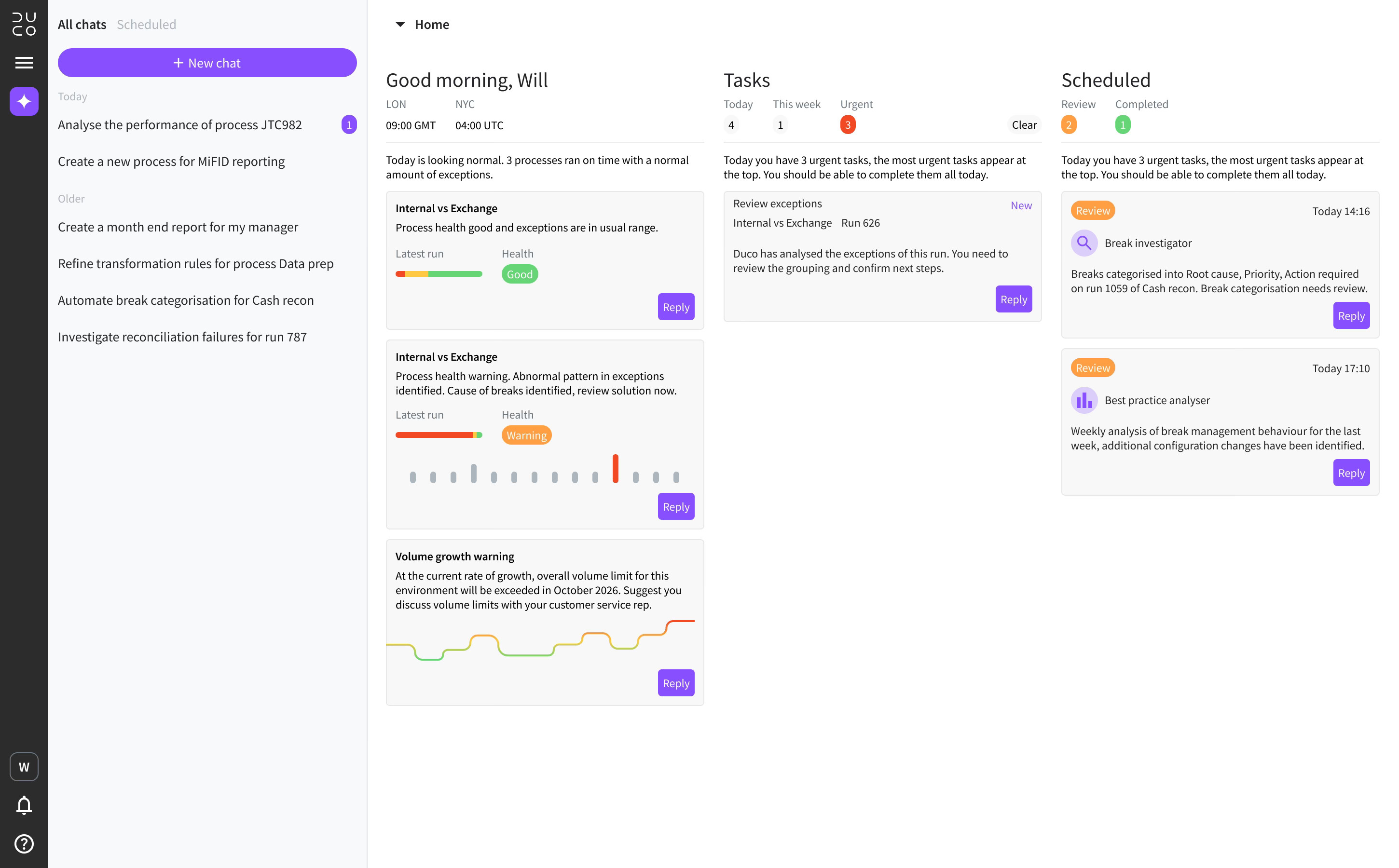
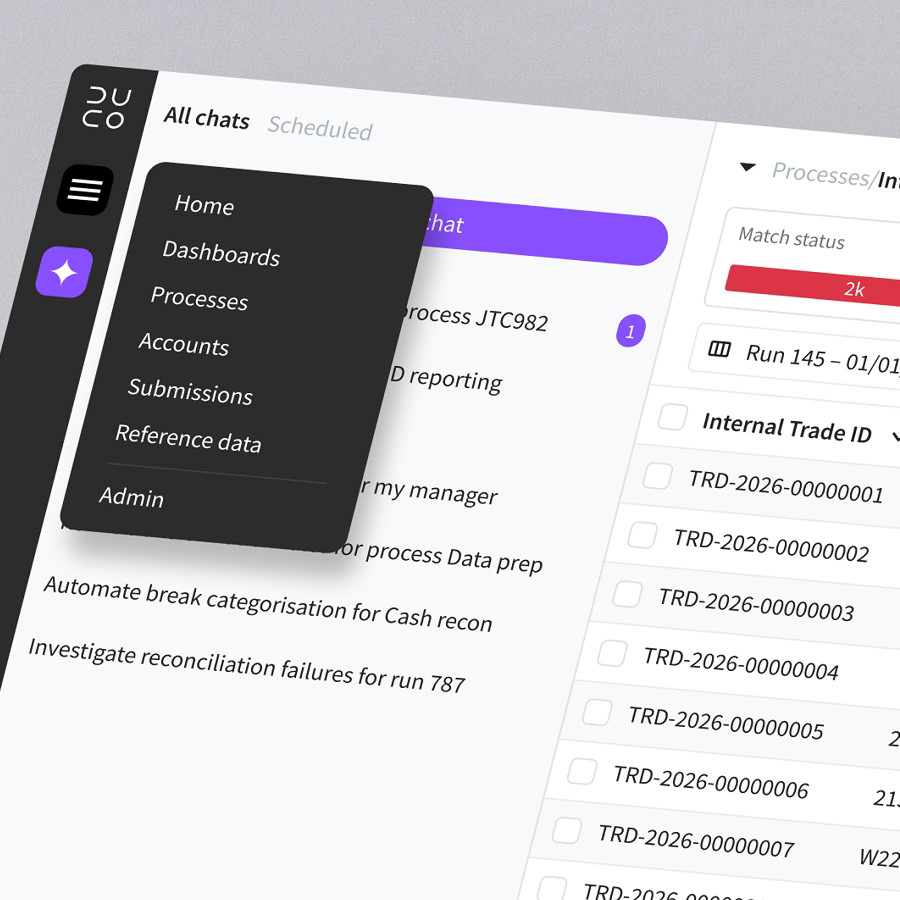
I identified a need for the first ever home page for the platform. This gives users a centralised and personalised place where they can monitor everything that matters to them. The home page is where agents provide unprompted insights it thinks the user should know. This includes monitoring on process health, trend analysis and prioritisation of tasks. As trust is the biggest challenge facing adoption, the home page helps increase transparency and control. Actions that require manual review and approval are also surfaced here, making it a reliable hub for agent monitoring.
man walking in front of textured wall

The home page is packed with meaningful insights from unprompted agents, constantly looking for ways to improve productivity

Adding context to a chat

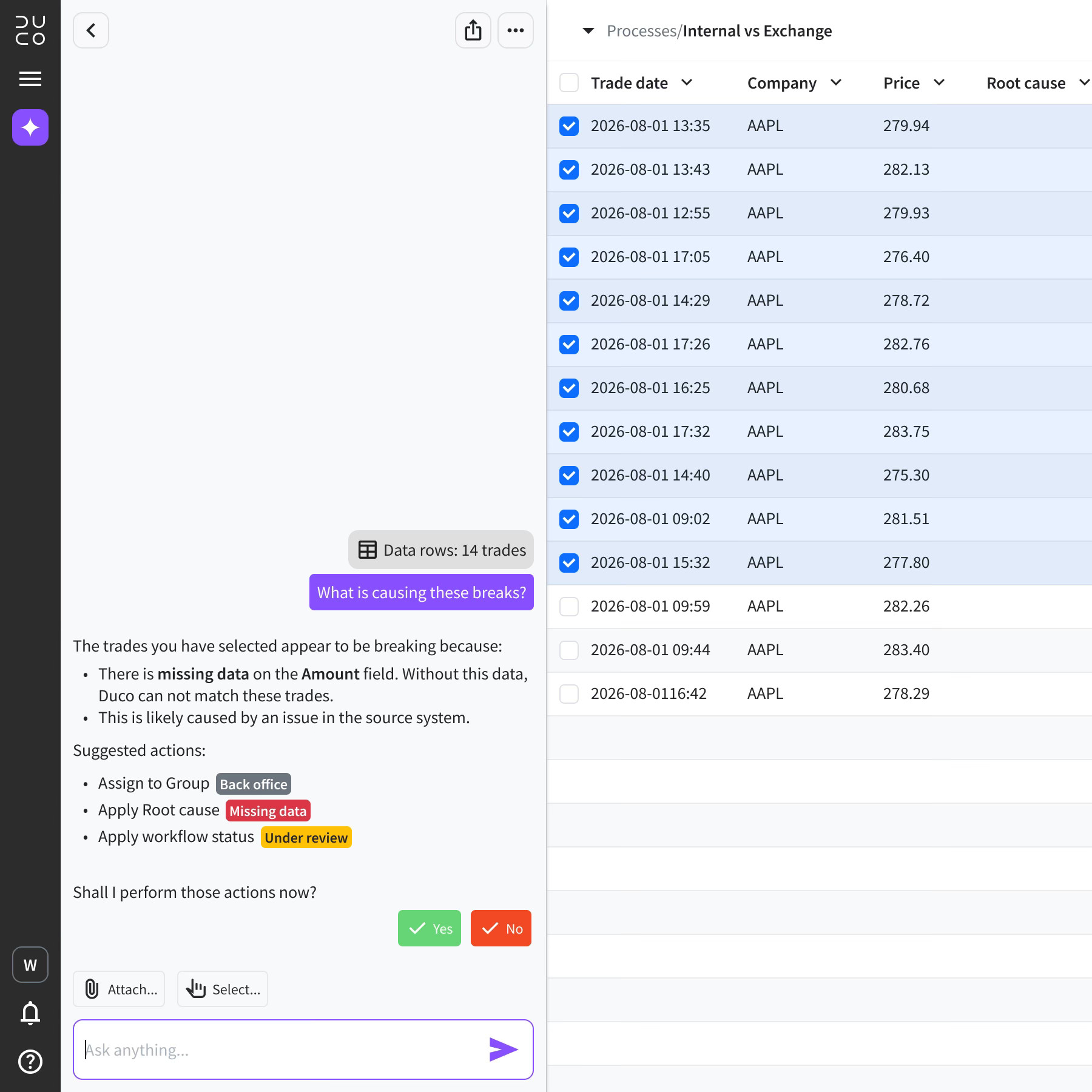
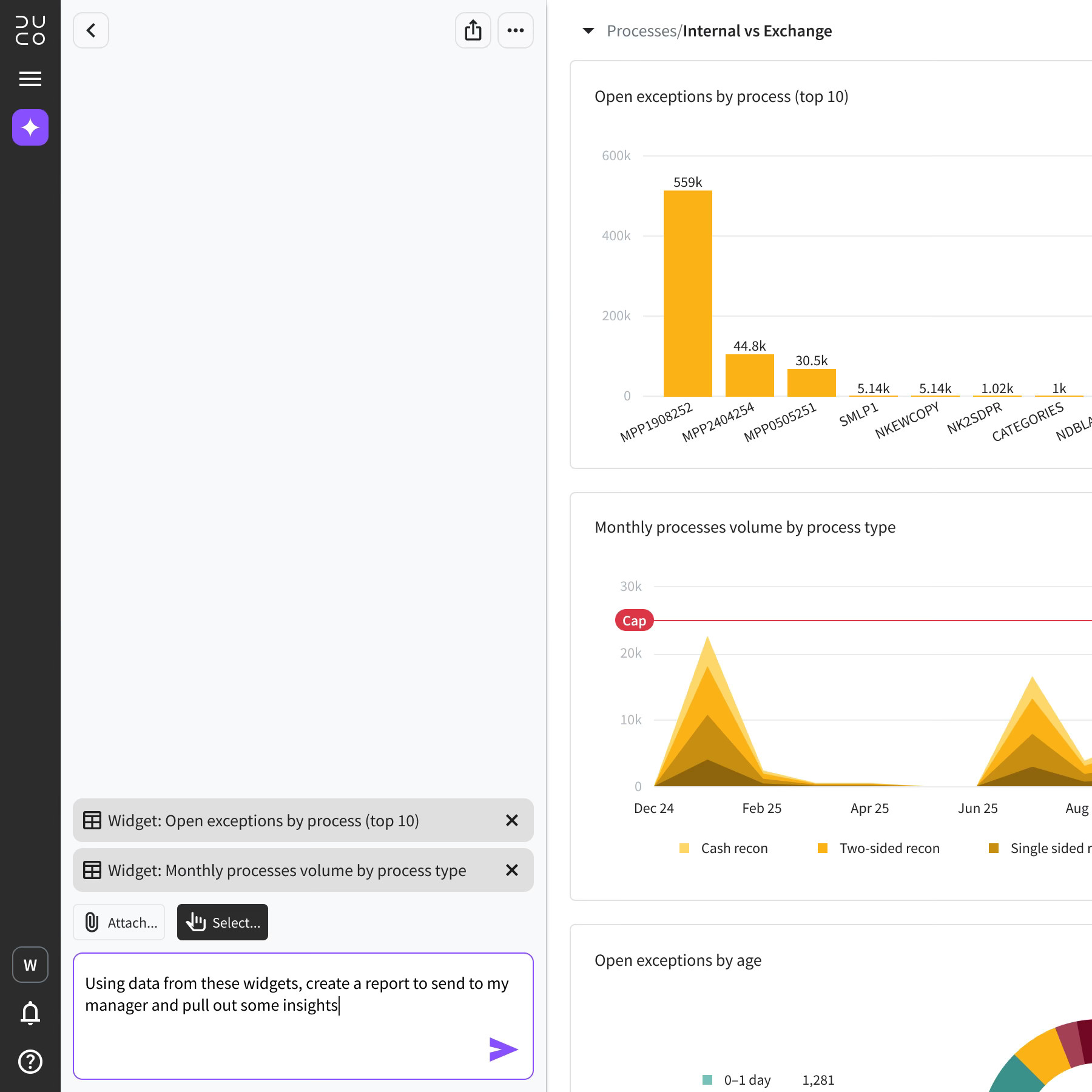
There are 2 ways to add context to a chat – attach a file from a computer or select something on the screen. They are both useful in certain scenarios, however the latter is faster, more direct and designed to help with repetitive daily tasks. Using the Select tool, the user can add items from the platform to the chat as context. This gives break investigation huge advantage as the user can select exceptions and query them or perform actions in seconds, reducing the need to download the data for investigation outside the platform.
man walking in front of textured wall

To add context to a chat, the user can select components directly from the platform – data rows, dashboard widgets and more

Other types of context include widgets, NRL rules or entire processes

Knowledge base

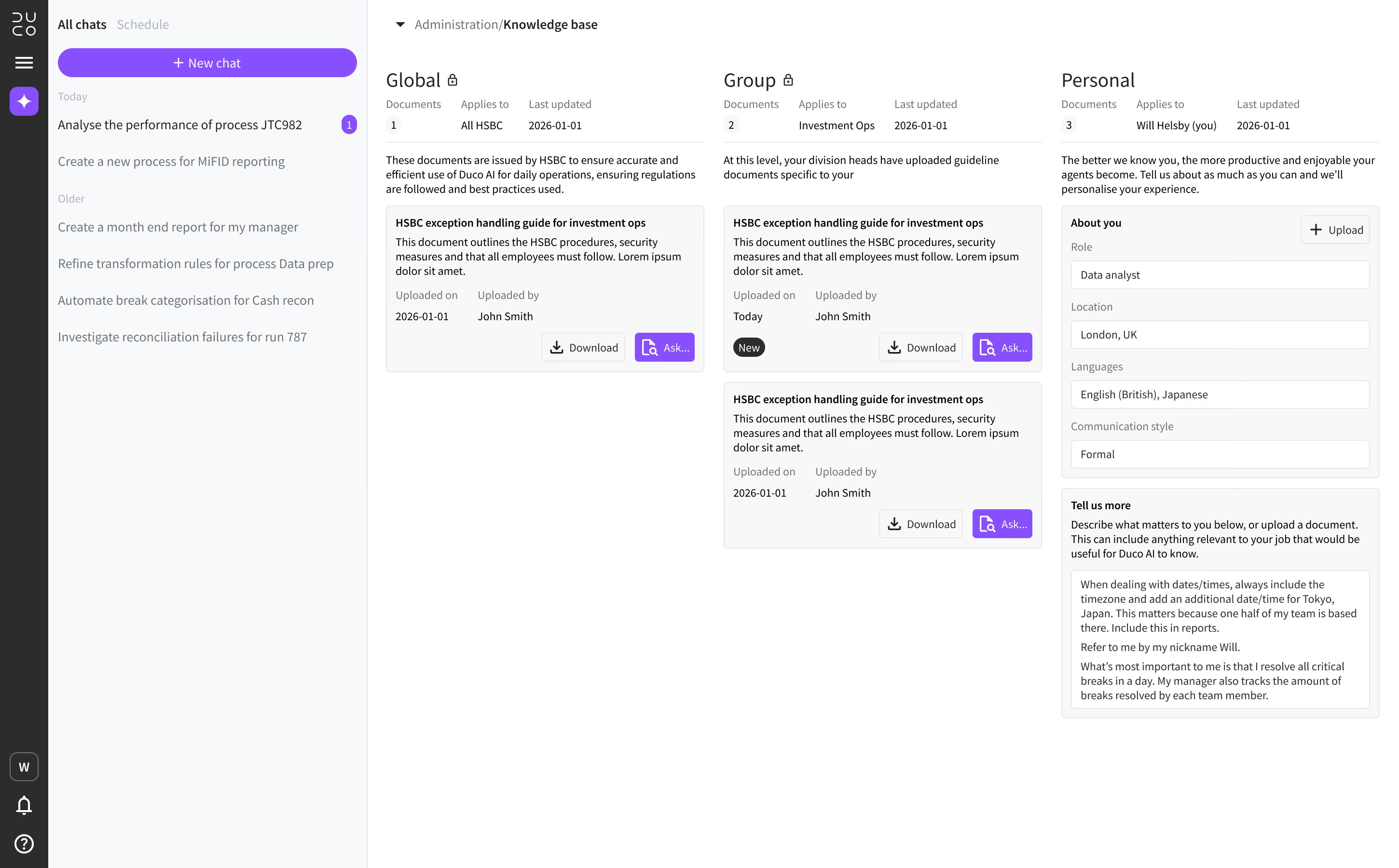
A requirement of agentic workspace is that it must be accurate and provide meaningful insights. Users will turned off with generic suggestions or constant mistakes that lead to distrust and a need for micro-management. Knowledge base is the solution. This new page gives agents a better understanding of the industry, company and users personal preferences with knowledge divided into 3 levels. This creates an amazing experience as it means agents actually understand who the user is and what their role is, speeding up conversations, increasing accuracy of responses and improving insights.

GlobalGlobal admin uploads company wide documents relevant to everyone at the business. General policies to be followed by all agents and all users.

GroupGroup admin uploads documents relevant to your department. It could be operational guidelines, resolution workflow, taxonomy, criticality framework and so on.

IndividualPersonal preferences of the individual user. Tell the agent about your role, languages, communication style, preferred formats and anything else you want the agent to know.
man walking in front of textured wall

Agents use knowledge base documents to give users the most reliable, accurate and insightful experience

Review

Mission success

The outcome of this project was more impactful than any I have worked on. Agentic workspace is not just a bolt-on AI chatbot, it reimagines the entire Duco user experience and role of operations professionals. By keeping the design rooted in familiar patterns, users quickly adopted the feature and feedback was overwhelming. Speed, accuracy and predictability are all improved by a huge margin. Building a process went from days to minutes. The way of working has shifted from manual investigation to a manager style, review based day.
man walking in front of textured wall

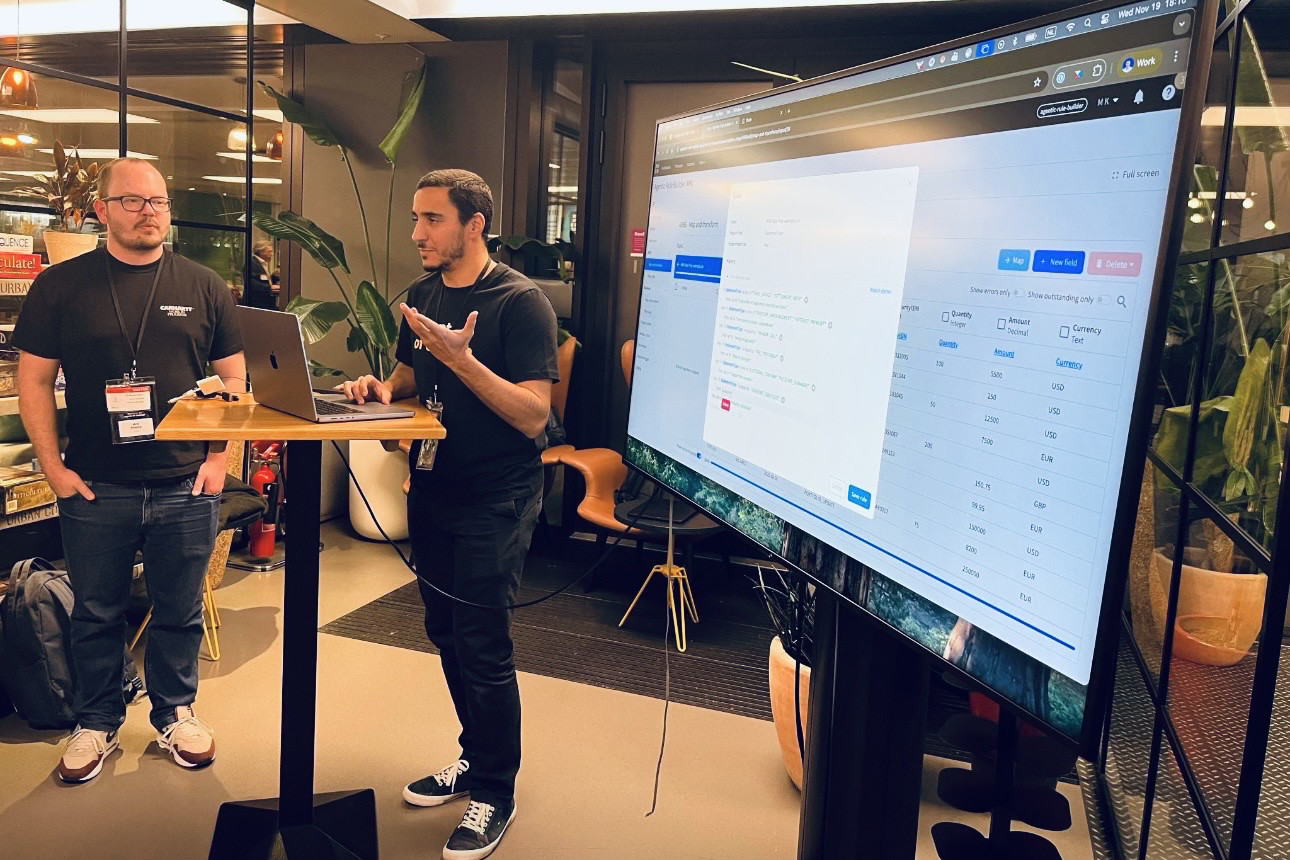
Presenting agentic workspace to customers at Duco Innovation Day 2025, AWS, London

Looking ahead

I designed agentic workspace as a platform that supports our AI roadmap, with new capabilities being released all the time. The benefit to our customers is huge and continues to grow. Customers have reduced risk while saving costs. The benefit to the company are just as powerful, revenue has increased as the demand for AI powered tools keeps growing. By investing in product design, Duco offers the best user experience in it’s industry, setting the bar for which competitors struggle to reach. In turn, user satisfaction scores are high, sales increase and churn reduced.
More projects

Duco

UI 3

Explore

abstract painting

Duco

Data prep

Explore

stationery materials laying on a grid

© Will Helsby 2026 All Rights Reserved

Duco

Agentic workspace

Creating a world where operations professionals supervise teams of agents and move from task-work to decision-making

man walking in front of textured wall

Designed to be “always open”, agentic workspace reimagines the user as an agent manager

Brief

MissionDuco is an operational data automation platform used by the world’s biggest banks. Users perform repetitive, time consuming tasks while dealing with vast sets of fast moving data. This includes identification and analysis of issues, categorisation, allocation and resolution. While these task are tedious, they are also critical – mistakes cost millions of dollars. The mission was to create a collaborative environment where autonomous AI agents do the heavy lifting in a controlled, auditable way.

RoleAs Senior Product Designer, I led the UX strategy and design for this project. My focus was on designing the "collaboration layer" that allows human experts to work alongside AI agents with total transparency. I collaborated with the product team, engineering and in-house machine learning team. Agentic workspace continues to evolve rapidly with new enhancements almost weekly.

ResultAgentic Workspace is a powerful collaboration tool that grants users in operations control over an army of automated AI agents. Productivity skyrockets as users move away from slow manual work to overseeing the work of agents, redefining their role and removing limitations. Humans remain firmly in control to approve AI suggestions, while the knowledge hub ensures agents understand the business requirements and work accurately.

Research

The future workspace for operations

Research focused on identifying where human expertise is indispensable and where AI agents could provide the most value. To move from concept to functional requirements, I spoke to several customers from the Duco Innovation Group. This allowed me to test my UX concepts against the rigid compliance requirements of real-world data controllers in a high-stakes environment. As well as discussing tasks, we also spoke about human psychology. It takes time for people to adjust to a radical new way of working and it’s vital to understand barriers that could prevent this new feature from being adopted. Understanding and trust must be core to the design.

man walking in front of textured wall

Research revealed users are excited about agentic tech boosting productivity but have concerns around trust

Agentic workspace pillars

I discovered that operations across the trade lifecycle can be broken down into 3 pillars. Agentic workspace should cover all areas while adding a context layer, such as best practice or company guidelines.

BuildDrastically reduce the time to create processes using simple prompts and gain a complete understanding of the data and configuration logic.

OptimiseAgents should proactively suggest ways of improving process performance, such as reducing false exceptions, increasing reliability and reducing manual intervention.

ManageAutomating exception investigation and management such as root cause analysis, categorisation and assignment. Identify priority of issues and suggest solutions.

From task-worker to decision-maker

The research shifted design focus from incremental automation to a total operational shift, moving the user from "task-work" to "decision-making." I discovered that users were struggling with "fragmented tools" and "reactive firefighting," leading to the need of a unified command centre. In this new model, agentic workspace must support a "supervise and approve" workflow, where the user sets the strategy and agents execute the manual investigation. This ensured that expertise was no longer "locked in heads" but captured as institutional memory within the platform.

Design

Make it feel familiar

Working with agents is still new to most, especially in financial services, which tends to lag behind. However, outside the office, agentic tools are mainstream and certain UX patterns have become expected. For agentic workspace to be adopted, I want to use these existing mental models to make the interaction feel intuitive and familiar. Duco users don’t have time to learn a new tool. The UX feels familiar to users of ChatGPT, Gemini or Claude, while still bespoke to the Duco specific use cases.

man walking in front of textured wall

The agentic workspace drawer has been aligned to the left of the page — this is not a bolt-on AI interface, it’s core the the AI-first user experience

3 types of agent, 1 consistent experience

As agentic workspace will become the primary method of interaction, I want it to feel natural. While managing several agents could sound daunting, it’s something we already do with other people. I want to break down that distinction between agent and human. For example, we maintain conversations with colleagues, friends and family on apps and social media, . I identified 3 types of interaction that all feel natural and familiar:

New chatAsk an agent to assist with a one-off request. Simply start a new chat and enter a prompt, adding an attachment for context if desired.

“Create a new 2 sided rec with these files...”

Scheduled agentsAsk an agent to perform an action based on a specified trigger, such as a time or event. The agent will repeat this action automatically, according to instructions.

“Send me a report every Friday at 18:00...”

InsightsAn agent sends a message to the user autonomously – without being asked. Insights update the user with important information and assist with daily priorities.

“Improve match rates by 100%...”

man walking in front of textured wall

Maximise content area with a full height chat drawer

Chats and scheduled agents are clearly divided into separate tabs

Human in the loop

I identified a need for the first ever home page for the platform. This gives users a centralised and personalised place where they can monitor everything that matters to them. The home page is where agents provide unprompted insights it thinks the user should know. This includes monitoring on process health, trend analysis and prioritisation of tasks. As trust is the biggest challenge facing adoption, the home page helps increase transparency and control. Actions that require manual review and approval are also surfaced here, making it a reliable hub for agent monitoring.

man walking in front of textured wall

The home page is packed with meaningful insights from unprompted agents, constantly looking for ways to improve productivity

Adding context to a chat

There are 2 ways to add context to a chat – attach a file from a computer or select something on the screen. They are both useful in certain scenarios, however the latter is faster, more direct and designed to help with repetitive daily tasks. Using the Select tool, the user can add items from the platform to the chat as context. This gives break investigation huge advantage as the user can select exceptions and query them or perform actions in seconds, reducing the need to download the data for investigation outside the platform.

man walking in front of textured wall

The Select tool can add results data to the chat for investigation and actions

Other types of context include widgets, NRL rules or entire processes

Knowledge base

A requirement of agentic workspace is that it must be accurate and provide meaningful insights. Users will turned off with generic suggestions or constant mistakes that lead to distrust and a need for micro-management. Knowledge base is the solution. This new page gives agents a better understanding of the industry, company and users personal preferences with knowledge divided into 3 levels. This creates an amazing experience as it means agents actually understand who the user is and what their role is, speeding up conversations, increasing accuracy of responses and improving insights.

GlobalGlobal admin uploads company wide documents relevant to everyone at the business. General policies to be followed by all agents and all users.

GroupGroup admin uploads documents relevant to your department. It could be operational guidelines, resolution workflow, taxonomy, criticality framework and so on.

IndividualPersonal preferences of the individual user. Tell the agent about your role, languages, communication style, preferred formats and anything else you want the agent to know.

man walking in front of textured wall

Agents use knowledge base documents to give users the most reliable, accurate and insightful experience

Review

Mission success

The outcome of this project was more impactful than any I have worked on. Agentic workspace is not just a bolt-on AI chatbot, it reimagines the entire Duco user experience and role of operations professionals. By keeping the design rooted in familiar patterns, users quickly adopted the feature and feedback was overwhelming. Speed, accuracy and predictability are all improved by a huge margin. Building a process went from days to minutes. The way of working has shifted from manual investigation to a manager style, review based day.

man walking in front of textured wall

Presenting agentic workspace to customers at Duco Innovation Day 2025, AWS, London

Looking ahead

I designed agentic workspace as a platform that supports our AI roadmap, with new capabilities being released all the time. The benefit to our customers is huge and continues to grow. Customers have reduced risk while saving costs. The benefit to the company are just as powerful, revenue has increased as the demand for AI powered tools keeps growing. By investing in product design, Duco offers the best user experience in it’s industry, setting the bar for which competitors struggle to reach. In turn, user satisfaction scores are high, sales increase and churn reduced.

More projects

Duco

UI 3

Explore

abstract painting

Duco

Data prep

Explore

stationery materials laying on a grid